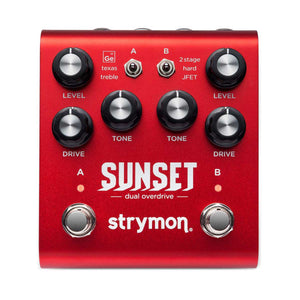
Sunset gives you the best of the best classic overdrive circuits, custom voiced for instantly gratifying control over a huge range of sought-after tones. We studied six circuit types found in many truly timeless and iconic overdrive and boost pedals, and put our takes on all six of them into a single two-channel unit.
Two pedals at once.
Sunset is really two customizable overdrive pedals, independently selectable and flexibly routable, designed and voiced for complementary tones when stacked. Six distinct circuits each feel and react differently in your hands, two at once, all in one convenient package. Push your amp any way you want, from transparent “more amp” to heavy saturated fuzz, and all the best places in between.
Holy Grail tone, minus the quest.
We are all familiar with the endless search for the ultimate overdrive pedal and the perfect tone. We did the critical listening and custom voicing to design each side of Sunset with just one tone knob, so you can quickly dial in the sound you want. The knob ranges for each circuit type are custom calibrated to provide maximal usable control. We applied the same design philosophy and care to the stacking options, ensuring each combination interacts optimally and sounds great, so a huge range of classic overdrive tones are instantly achievable.
Features
Six drive circuit topologieswith custom tuned voicing for each drive type
Precision crafted drive circuits stackable in multiple combinations for a wide variety of complex, responsive tones.
Analog class A JFET input gain stage maximizes headroom while adding up to 20dB of pure analog gain
Drive and Tone control ranges optimized for each circuit topology
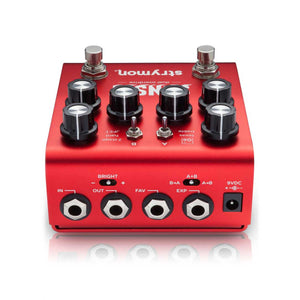
Series, reverse series, and paralleldrive circuit stackingvia Config switch
Bright switch to tailor the sound for use with all amplifiers from dark to bright
Optional variable-threshold noise reduction for taming noisy guitar pickups
Recently viewed products
PayPal Pay Later Messaging
Step 1: Choose message placement
Click the button below and then hover over your page to select a placement.
Step 2: Paste and save
You have copied the placement for the Product Page.
Go back to the App Embeds section, and in the Paypal Advanced Settings, paste the copied value into the
Product Page field and click the 'Save' button in the top right corner.